
We just launched a powerful new enhancement to the Roth IRA Conversion Optimizer — the FIRE Dashboard, designed to give users a crystal-clear view of their FIRE (Financial Independence Retire Early) journey.
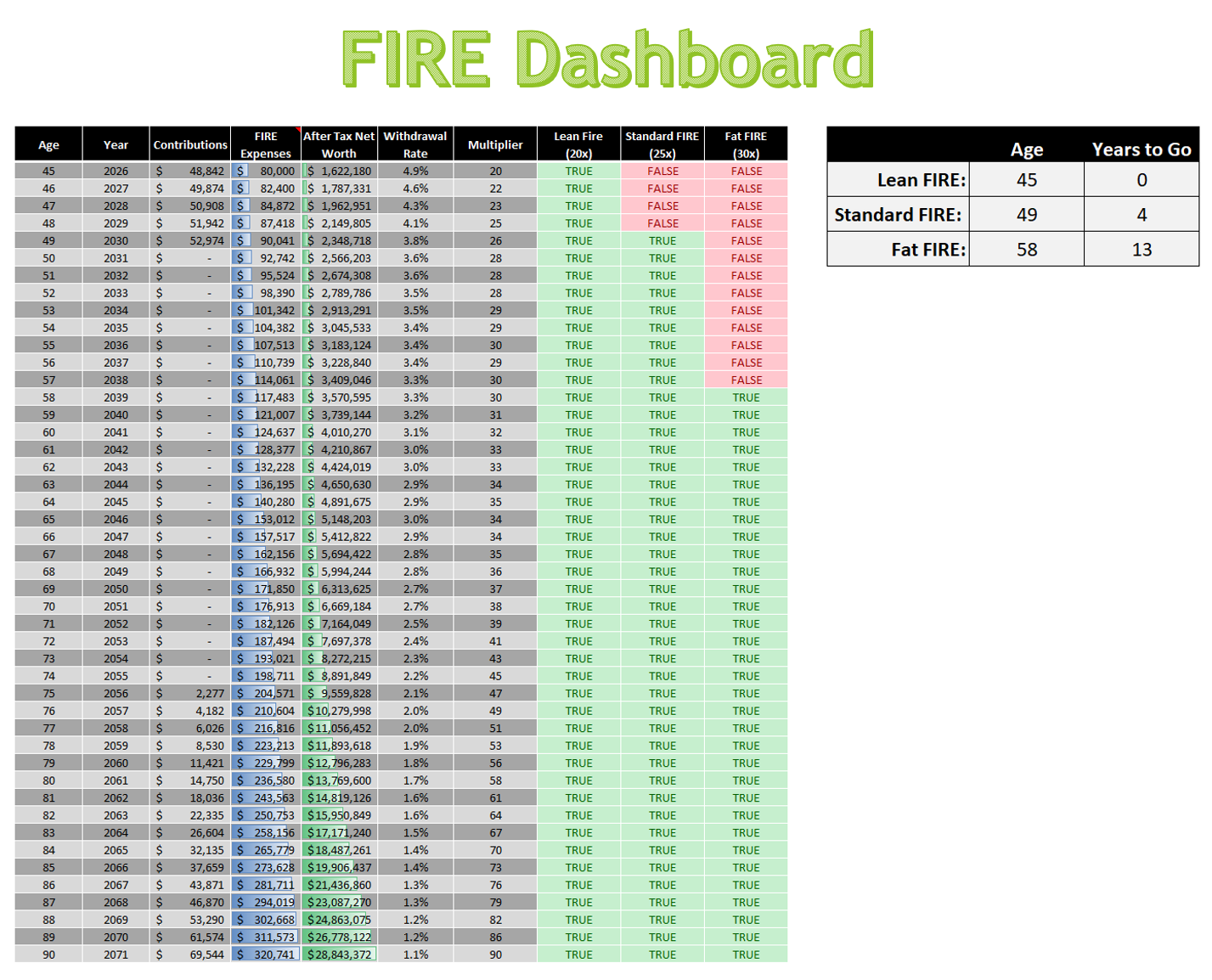
Whether you’re aiming for Lean FIRE, Standard FIRE, or Fat FIRE, this dashboard shows exactly where you stand and how far you have to go.
🔍 What’s Inside the Dashboard?
- Year-by-Year Tracking: See your age, contributions, FIRE expenses, and after-tax net worth across your entire retirement horizon.
- Withdrawal Rate & Multiplier: Instantly assess your sustainability using dynamic withdrawal rates and FIRE multipliers.
- FIRE Milestone Flags: Visual indicators show when you hit Lean (20×), Standard (25×), and Fat (30×) FIRE thresholds.
- Summary Panel: A clean sidebar highlights the age and years remaining until each FIRE milestone is achieved.
🧠 Why It Matters
Traditional retirement calculators often bury the signal in noise. This dashboard isolates the key metrics that matter most to early retirees:
- After-tax net worth — not just gross balances
- Tax-aware modeling — including Roth conversions, IRMAA, and Social Security taxation
- Lifestyle-based expenses — separating strategic tax moves from true cost of living
It’s not just a spreadsheet — it’s a decision engine.
💡 Built for Clarity, Designed for Action
This feature is built on the same principles the FIRE community has used for years to determine when they can retire. We are taking the withdrawal rates, spending multipliers, and after‑tax net worth focus that the community already relies on and applying those ideas in a tool that also enables you to optimize your Roth IRA conversions and calculate your risk with a Monte Carlo analysis. Nothing here is new to FIRE followers. We are simply packaging the existing concepts into a clear, intuitive, and fully tax‑aware dashboard that supports real‑world decision making.

