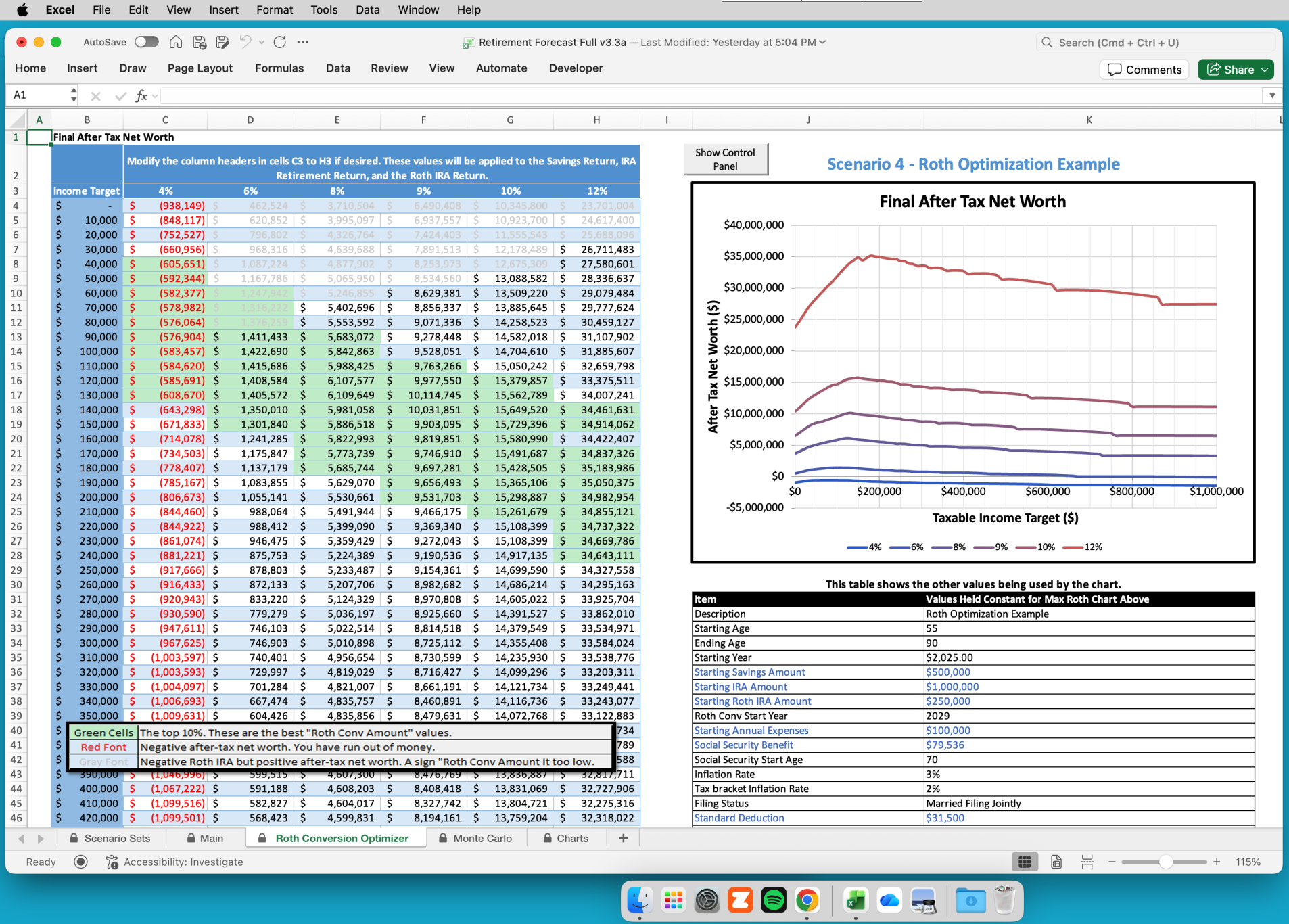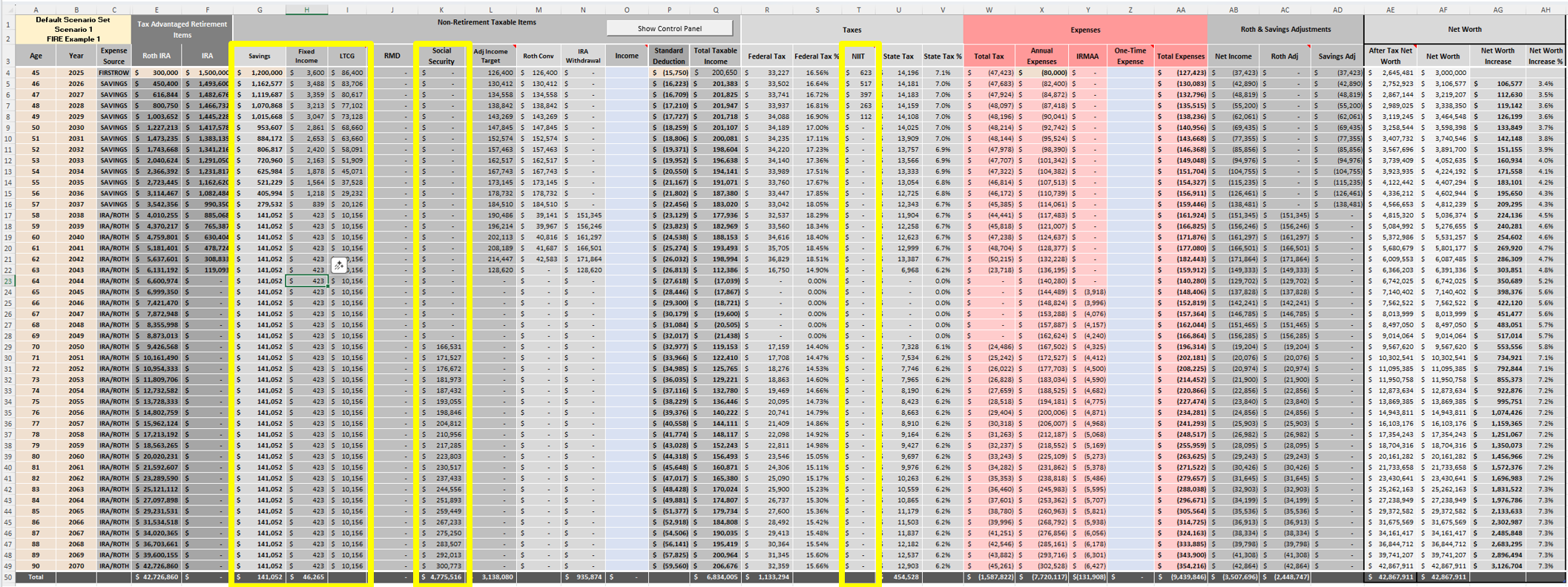
A number of topics are cued up which will be posted over the coming months. Feel free to respond to this post if there are topics you’d like to see.
-
Hidden Worksheets
The main interface of the Roth IRA Conversion Optimizer is intentionally clean and approachable. Users will spend most of their time setting up Scenarios on the Scenario Set worksheet and viewing the results on the Main worksheet. Beneath that simplicity lies a sophisticated, tax-aware engine that calculates:
- Separate IRAs, RMDs and Social Security for Married Filing Jointly
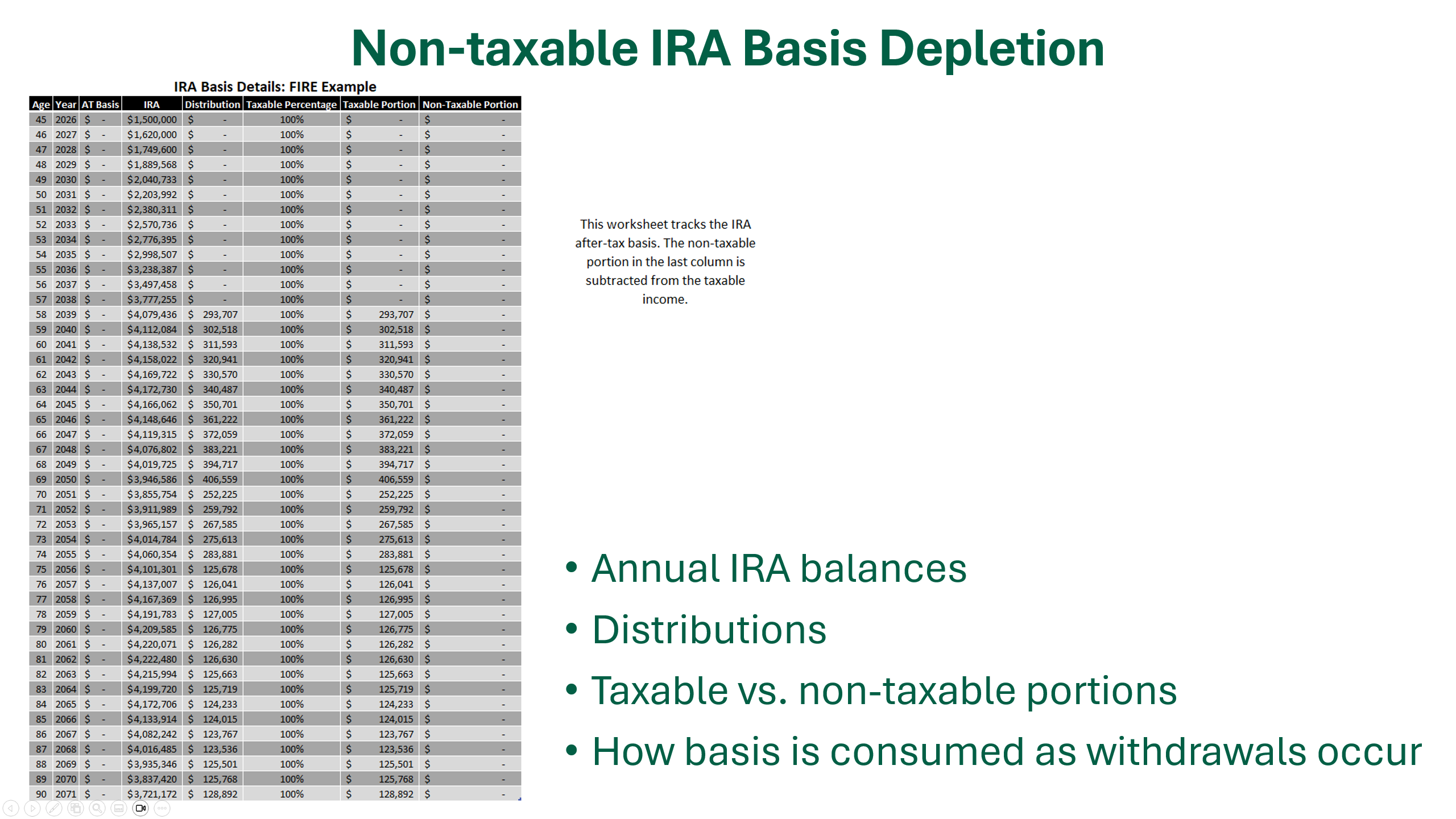
- Non-taxable IRA basis depletion
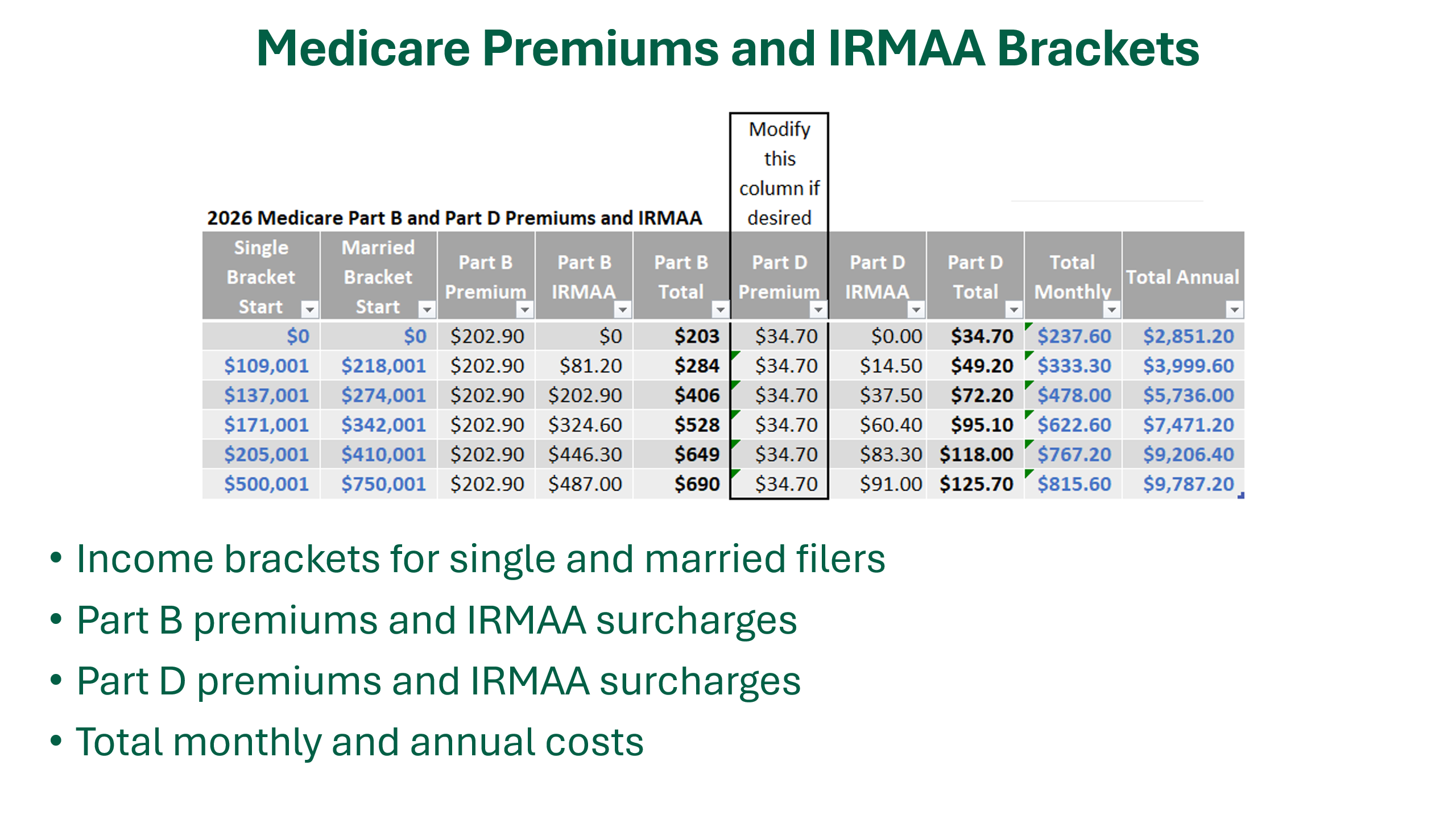
- Medicare Premiums and IRMAA brackets
- Federal and state tax brackets

Available at excelappshop.etsy.com For users who want to see this additional detail, there are four hidden worksheets. Users can “Unhide” these worksheets if desired.
📄 Worksheet 1: Separate IRAs, RMDs and Social Security for Married Filing Jointly
Designed for Married Filing Jointly scenarios, this sheet isolates the IRA balances, RMD requirements, and Social Security projections for both individuals to ensure tax accuracy. Key data includes:
- Annual IRA balances
- RMD calculations
- Social Security benefit projections
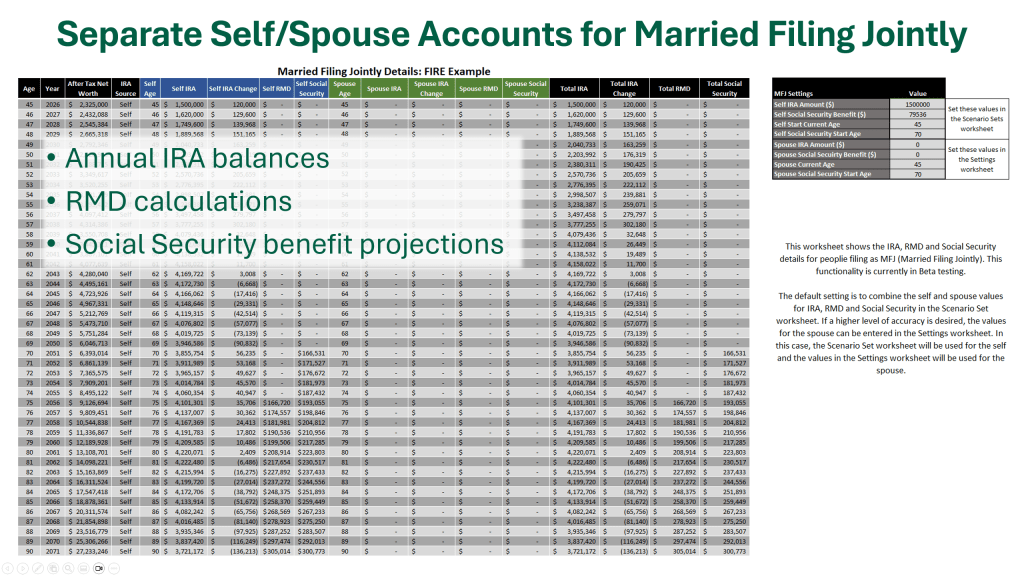
This worksheet is essential for accurately modeling tax implications and timing of distributions for married couples.
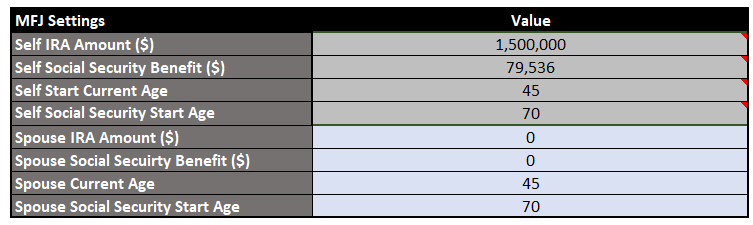
The values for the “Self” are set in the Scenario Set on the Scenario Sets worksheet. The values for the “Spouse” are set in the Settings worksheet as shown below.
Important nuances:
- Married Filing Jointly couples often have different ages, meaning their RMDs, which are specific to each individual’s IRAs, start at different times. This staggered timing affects the overall distribution strategy and tax planning.
- Similarly, couples may receive different Social Security benefit amounts, which can begin at different ages or times, impacting cash flow and tax considerations.
Why it’s useful: Anyone who wants to audit or understand how the Optimizer handles IRAs, RMDs, and Social Security for married filers can see the detailed calculations here.
📄 Worksheet 2: Non-taxable IRA Basis Depletion
This sheet tracks the after‑tax basis inside an IRA over time. It shows:
- Annual IRA balances
- Distributions
- Taxable vs. non‑taxable portions
- How basis is consumed as withdrawals occur
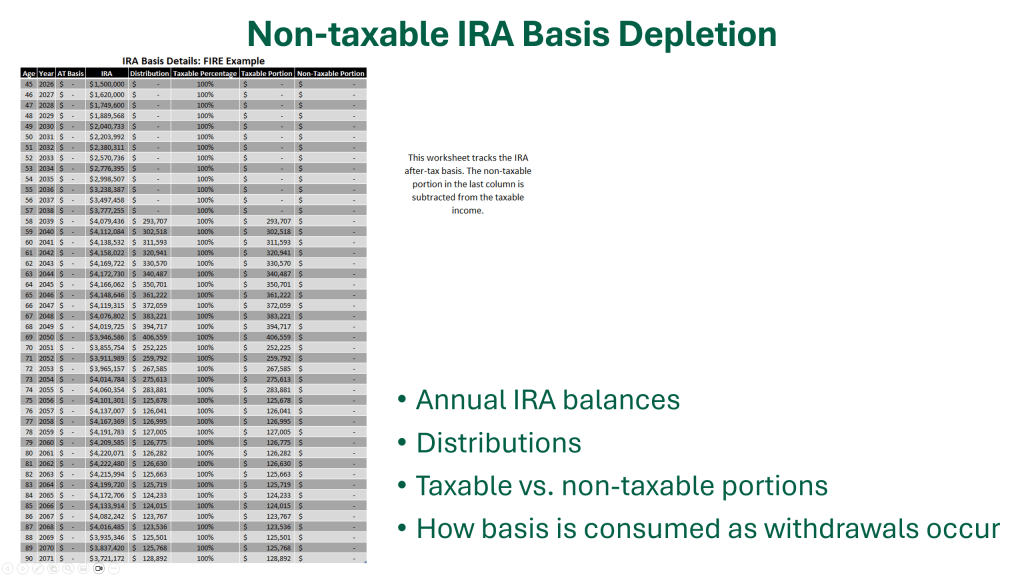
This is especially important for users who have made non‑deductible IRA contributions or executed backdoor Roth conversions. The Optimizer uses this sheet to correctly calculate the taxable portion of each distribution, ensuring the model aligns with IRS Form 8606 rules.
The IRA after-tax basis can be entered on the Settings worksheet as shown below.
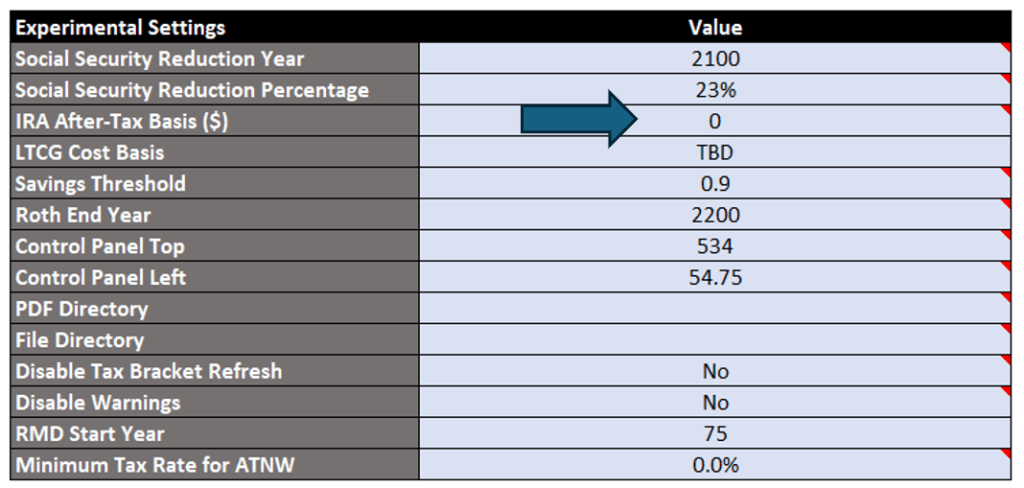
Why it’s useful: Anyone who wants to audit how the Optimizer handles basis depletion can see the year‑by‑year math here. It’s also a great educational tool for understanding how basis interacts with RMDs later in life.
📄 Worksheet 3: Medicare Premiums and IRMAA Brackets
This sheet contains the full 2026 Medicare Part B and Part D premium and IRMAA tables. It includes:
- Income brackets for single and married filers
- Part B premiums and IRMAA surcharges
- Part D premiums and IRMAA surcharges
- Total monthly and annual costs

The Optimizer uses these tables to calculate the true after‑tax impact of Roth conversions, since conversions can push income into higher IRMAA tiers.
The Part D premium can be edited directly in this table if other values are desired.
Why it’s useful: Users can see exactly how their projected income interacts with Medicare costs. Financial advisors can use this sheet to explain IRMAA cliffs to clients.
📄 Worksheet 4: Federal and State Tax Brackets
This sheet stores the federal and state tax bracket structures based on the filing status and state selected in the Startup Values Manager. It includes:
- Federal tax rates and brackets
- State tax rates and brackets
- Editable bracket mode for exploring other tax scenarios
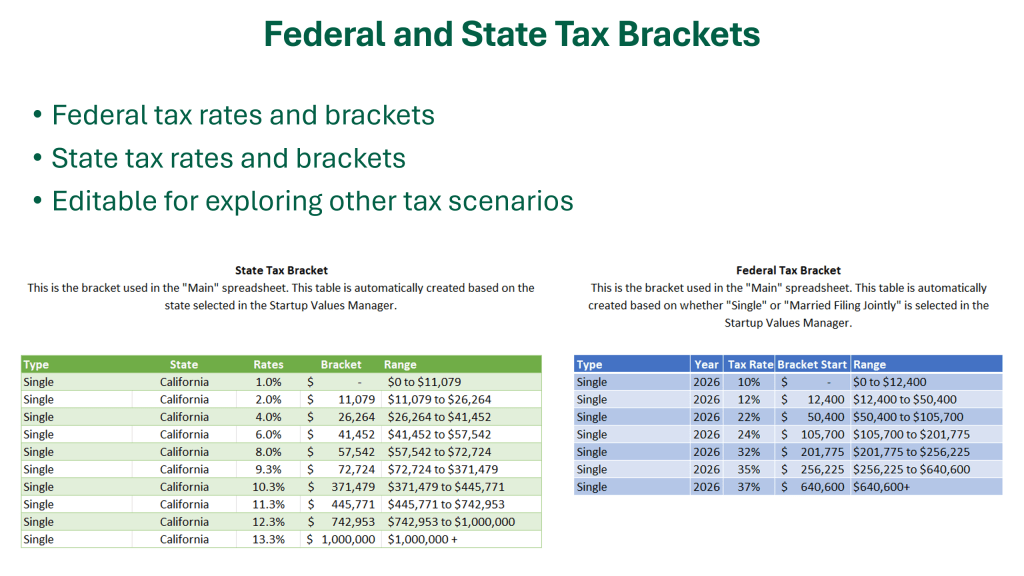
The Optimizer uses this sheet to calculate state and federal taxes and to determine how Roth conversions interact with marginal rates.
To modify the brackets, set “Disable Tax Bracket Refresh” to “Yes” in the Settings worksheet and then edit the table(s) directly on the Tax Brackets worksheet.

Why it’s useful: State and federal taxes can dramatically change the optimal conversion strategy. This sheet lets users audit or customize their tax bracket structures—especially helpful for states with unusual rules.
🔓 How to Unhide These Worksheets
We hide these four worksheets to keep the main workflow streamlined and easy to use. But if you want to explore them:

On Windows or Mac (Excel Desktop)
- Right‑click any worksheet tab.
- Select Unhide…
- Choose the sheet you want to reveal.
- Click OK.
To Re‑Hide a Sheet
- Right‑click the sheet tab.
- Select Hide.
🧠 Why These Sheets Matter
These hidden worksheets make the Optimizer:
- Transparent — the behind-the-scenes detail is visible and auditable.
- Accurate — tax and IRMAA logic is based on real bracket tables.
- Customizable — advanced users can modify the federal/state brackets and the Medicare part D premium.
- Streamlined — moving complex calculations to background sheets keeps your primary workspace clutter-free.
Ready to see it for yourself? You can explore these features in the latest version of the Roth IRA Conversion Optimizer.
-
2026 State Tax Brackets Now Available in the Roth IRA Conversion Optimizer
The 2026 State Tax Brackets are now fully integrated into the Roth IRA Conversion Optimizer. This update completes the tax‑aware engine for the 2026 planning year and ensures that every projection, scenario, and Monte Carlo simulation reflects the most accurate tax landscape available.
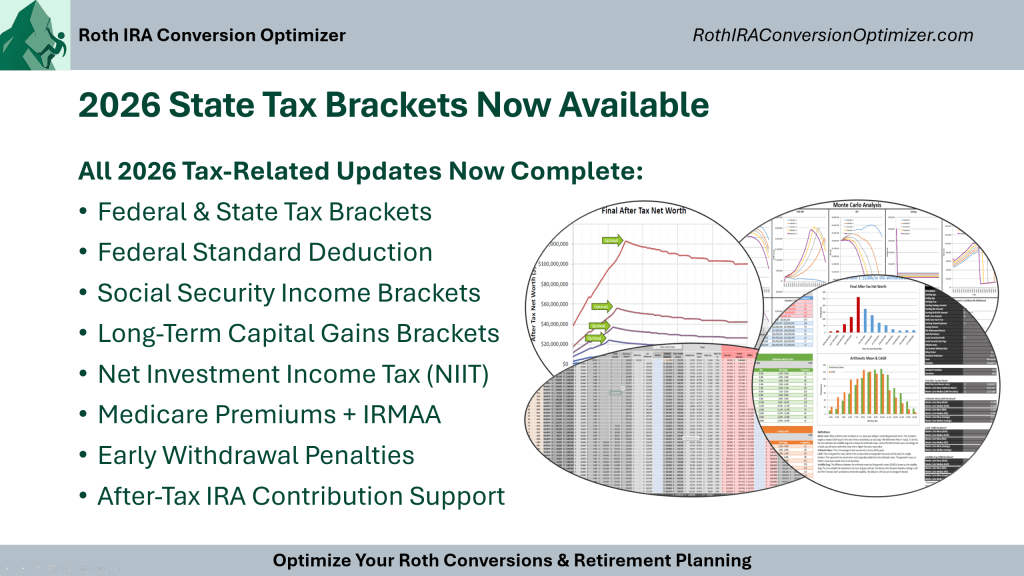
Available at excelappshop.etsy.com For users who rely on the Optimizer to make informed Roth conversion decisions, this update brings the entire federal and state tax picture into alignment, giving you a complete, end‑to‑end view of how conversions affect lifetime taxes, retirement income, and long‑term net worth.
What’s New: 2026 State Tax Brackets
Many states release their tax brackets later than the IRS. Now that all the states have published their 2026 brackets, the Optimizer incorporates these new brackets into the tax calculations along with adjustments for inflation in the future years.
This ensures that your conversion strategy is based on the most current state tax information available.
A Reminder of Everything the Optimizer Handles for You
The Roth IRA Conversion Optimizer isn’t just a conversion calculator. It is a full tax‑aware planning engine that models how every dollar of income interacts with federal and state tax systems over time, producing accurate long‑term forecasts that support smarter retirement decisions.
Here’s a quick refresher on the other tax components built into the tool:
State and Federal Income Tax Brackets
The Optimizer uses the official 2026 tax tables for the most common filing statuses (MFJ, Single, and HoH), including:
- Ordinary income brackets
- Federal standard deductions
- Inflation adjustments
Every scenario you run reflects the state and federal tax owed for each year of retirement.
Social Security Taxation
The Optimizer models:
- Provisional income
- 0%, 50%, and 85% taxation tiers
This ensures the model doesn’t overtax Social Security in your lower income retirement years.
Long‑Term Capital Gains (LTCG) Brackets
Conversions can push you into higher LTCG brackets. The Optimizer tracks:
- 0%, 15%, and 20% LTCG tiers
- Interaction with ordinary income
- NIIT thresholds
This helps you avoid “accidental” capital gains tax increases.
Net Investment Income Tax (NIIT)
The Optimizer includes:
- The 3.8% NIIT
- MAGI thresholds
- Interaction with conversions and RMDs
This enables high‑income households and retirees to minimize extra investment taxes.
Medicare Premiums (IRMAA)
Roth conversions can trigger higher Medicare premiums. The Optimizer models:
- Part B and Part D premiums with IRMAA brackets
- Two‑year lookback rules
- Annual inflation adjustments
This allows you to avoid IRMAA “cliffs” that can add thousands to your healthcare costs.
Early Withdrawal Penalties
For early retirees, the Optimizer understands:
- 10% early withdrawal penalties
- 72(t) SEPP exceptions
- Rule of 55 exceptions
This makes the tool uniquely powerful for FIRE‑oriented users.
After‑Tax IRA Contribution Support
The Optimizer handles:
- Basis tracking
- Pro‑rata rule tax calculations
This ensures your conversion strategy is accurate even if your IRA contains both pre‑tax and after‑tax dollars.
Why This Matters for Your 2026 Planning
With both federal and state tax systems now fully updated for 2026, you can:
- Run accurate Roth conversion scenarios
- Compare multi‑year strategies
- Avoid penalties and tax cliffs
- Minimize lifetime taxes
- Improve long‑term after‑tax wealth
- Stress‑test your plan with Monte Carlo simulations
Whether you’re an individual investor or a financial advisor, the Optimizer gives you a complete, tax‑aware view of your retirement strategy for the years ahead.
-
Effortless Upgrades: How the 2026 Release Makes Year‑to‑Year Transitions Seamless
One of the biggest challenges with sophisticated financial models is keeping your work intact as new versions are released or as tax rules change from year to year. Nobody wants to rebuild scenario sets, re‑enter assumptions, or recreate custom settings every time a new revision comes out.
That’s exactly why the 2026 release of the Roth IRA Conversion Optimizer includes a fully redesigned Import System — built to make upgrades smooth, fast, and frustration‑free.
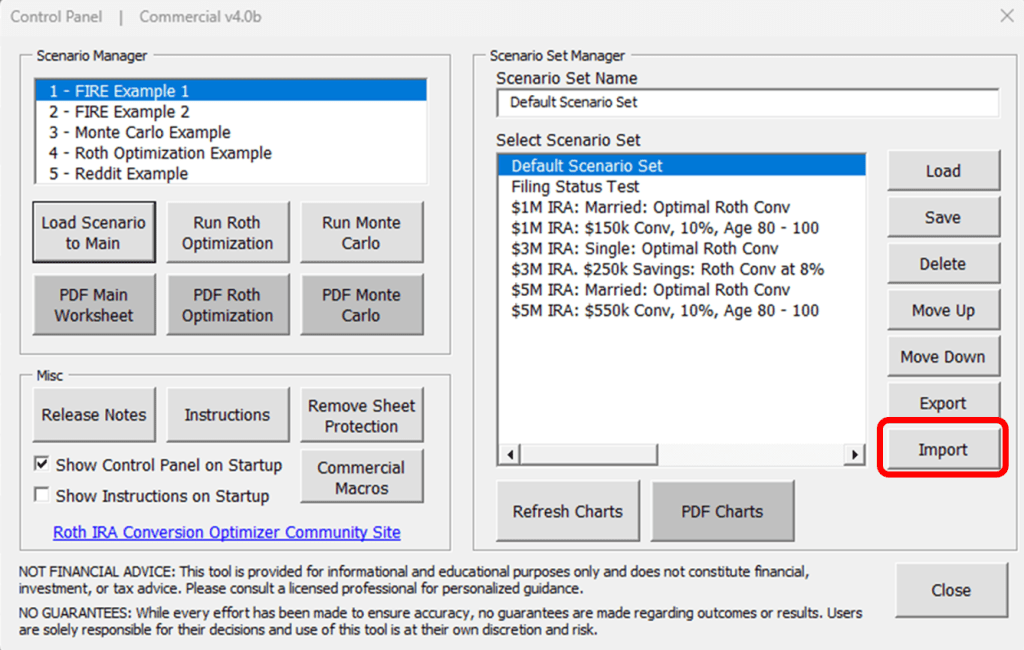
Available at excelappshop.etsy.com Whether you’re moving from the 2025 workbook into the 2026 edition or transitioning between revisions, the import tools ensure your work comes with you.
Upgrade to New Revisions or Tax Years With Confidence
The import system is designed to let you move forward without losing any of the work you’ve already done. With just a few clicks, you can bring your entire setup into the newest version of the spreadsheet.
This includes:
- All Scenario Sets
- All Additional Settings
- All Experimental Settings
- All user‑defined inputs (the blue columns)
No manual copying. No re‑entry. No risk of missing a setting buried somewhere in the workbook.
Just open the 2026 release, run the import, and continue where you left off.
Import All Blue Editable Columns (via a Separate Macro)
Many users rely heavily on the blue editable columns in the Main sheet — especially for custom income, expenses, or one‑time events.
These can now be imported as well using a dedicated macro designed specifically for those user‑editable fields. Just click the macros button (Alt + F8 on Windows) and run the “Import Blue Columns” macro.
This gives you complete continuity across versions, even if you’ve made extensive customizations.
Import Directly From the Previous Revision — No Export Required
One of the most convenient parts of the new system is that you don’t need to export anything ahead of time.
Just select your previous workbook, and the import tool reads everything it needs directly from that file:
This makes it incredibly easy to upgrade whenever a new revision is released — or when you’re rolling forward into a new tax year.
Bonus for Commercial Users: Export Scenario Sets for Client Work
If you’re using the Commercial or Extended Commercial edition, you also gain the ability to export scenario sets into a standalone file.
This is ideal for:
- Sharing scenarios with clients
- Preparing deliverables for planning meetings
- Archiving scenario sets for compliance
- Moving scenario sets between workbooks or team members
It’s a clean, professional way to package your work and deliver it to others without exposing the rest of your model.
Why This Matters
The import system isn’t just a convenience feature — it’s a long‑term foundation for how the tool evolves. As tax laws change, new features are added, and planning strategies become more sophisticated, you’ll be able to upgrade without losing momentum.
Your data stays intact. Your scenarios stay intact. Your workflow stays intact.
And you stay focused on what matters: building smarter, more tax‑efficient retirement plans.
-
Why Monte Carlo Matters: Bringing Real‑World Uncertainty Into Your Retirement Plan
Retirement planning isn’t just about spreadsheets and assumptions; it’s really about getting ready for all the curveballs life can throw at you. Markets jump around, inflation changes, tax laws shift, and life rarely follows a straight path. Even so, most planning tools still lean on a single fixed return assumption, a neat little number that looks tidy on paper but doesn’t come close to capturing how real markets behave.
That’s where the Monte Carlo simulation engine in the Roth IRA Conversion Optimizer becomes essential. Instead of pretending the future is predictable, it helps you understand how your plan performs across thousands of possible futures.

Available now at https://excelappshop.etsy.com It’s one of the most important features in the entire workbook, and here’s why.
1. Markets Don’t Move in Straight Lines
A single return assumption, like “8% per year”, hides the volatility that actually drives long‑term outcomes. Two portfolios can average the same return and end up in wildly different places depending on the sequence of gains and losses.
Monte Carlo simulations capture this reality by modeling:
- Year‑to‑year market variability
- Sequence‑of‑returns risk
- The compounding effect of good and bad timing
- How withdrawals interact with volatility
Instead of one outcome, you see a distribution of outcomes — and that distribution tells you far more about the resilience of your plan.
2. Probability of Success: A Clear, Actionable Metric
One of the most useful outputs of the Monte Carlo engine is the Probability of Success, a single number that tells you what percentage of simulated futures resulted in a positive outcome.
In most cases, this means:
- You didn’t run out of money
- Your portfolio maintained a positive net worth
- Your withdrawal strategy held up under stress
This metric is displayed clearly on the main Monte Carlo chart, making it easy to interpret results at a glance. Whether the probability is 92% or 59%, it gives you a quick sense of how resilient your plan is and whether it needs adjustment.
3. See How Roth Conversions Perform Under Stress
One of the most powerful uses of Monte Carlo analysis is testing how Roth conversion strategies hold up in volatile markets.
The simulation engine helps you see:
- Whether conversions improve outcomes across most market paths
- How conversions affect downside risk
- Whether a strategy only works in “good markets” or holds up broadly
- How taxes, RMDs, and withdrawals interact with volatility
This is especially valuable for early retirees and FIRE households, where long time horizons magnify the impact of market swings.
4. Compare Scenario Sets With Real‑World Variability
Every scenario set you build, whether it involves different withdrawal strategies, different conversion schedules, or different income assumptions, can be run through the Monte Carlo engine.
This gives you a deeper understanding of:
- Which strategies are robust
- Which ones are fragile
- How small changes in timing or tax strategy affect long‑term risk
- How your plan behaves in both bull and bear markets
It’s not just about finding the “best” scenario. It’s about finding the one that performs well across a wide range of futures.
5. A More Honest, More Realistic View of Retirement Planning
Monte Carlo analysis doesn’t sugarcoat anything. It doesn’t assume perfect markets or smooth returns. It shows you the messy, unpredictable reality of long‑term investing and helps you build a plan that can withstand it.
That’s why the Monte Carlo engine is such an important part of the Roth IRA Conversion Optimizer. It turns your projections from a single guess into a spectrum of possibilities, giving you the clarity and confidence to make smarter decisions.
And with the Probability of Success metric front and center, you can interpret those possibilities with confidence, knowing exactly how often your plan holds up across thousands of market paths.
-
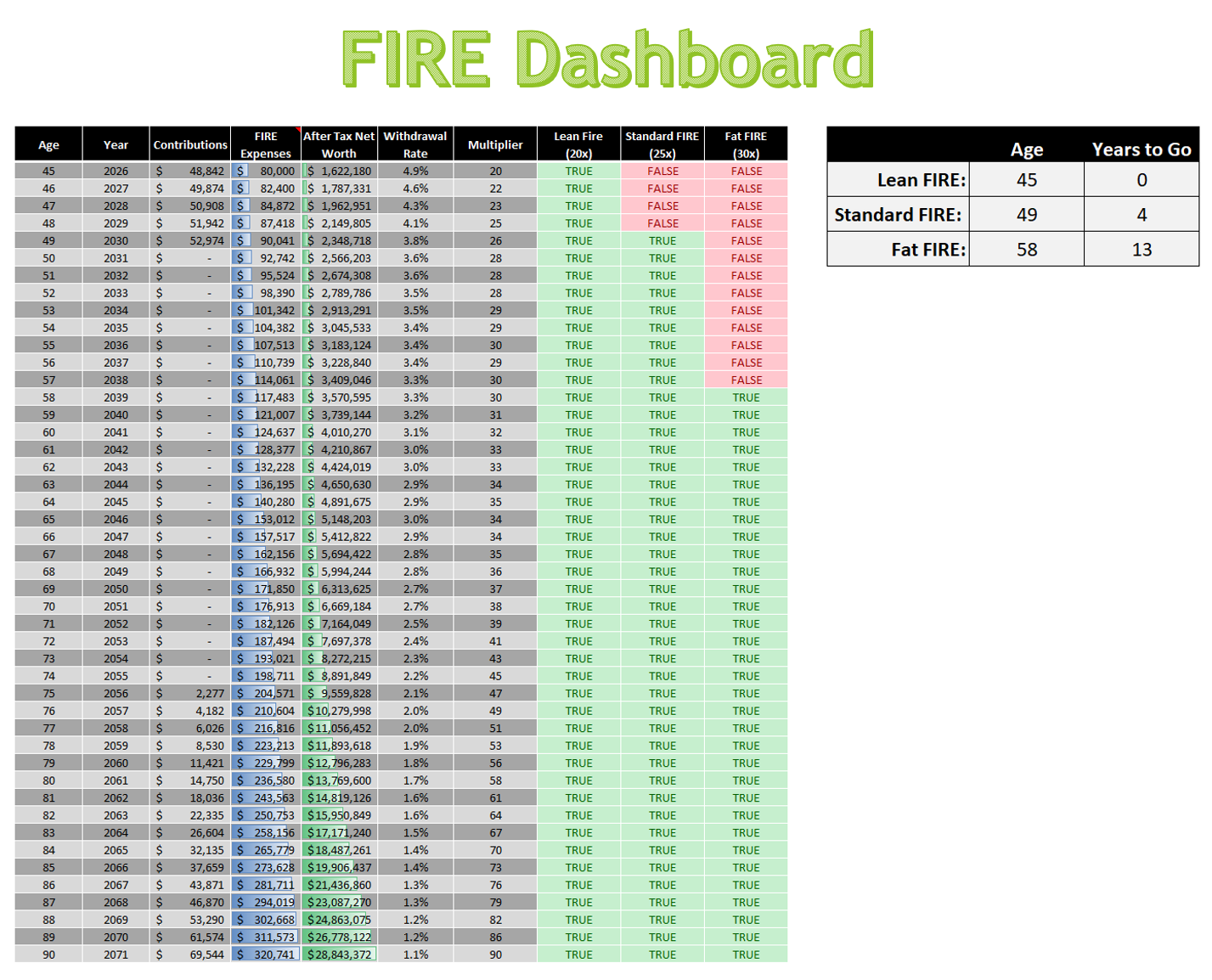
New FIRE Dashboard: Track Your Path to Lean, Standard, and Fat FIRE
We just launched a powerful new enhancement to the Roth IRA Conversion Optimizer — the FIRE Dashboard, designed to give users a crystal-clear view of their FIRE (Financial Independence Retire Early) journey.
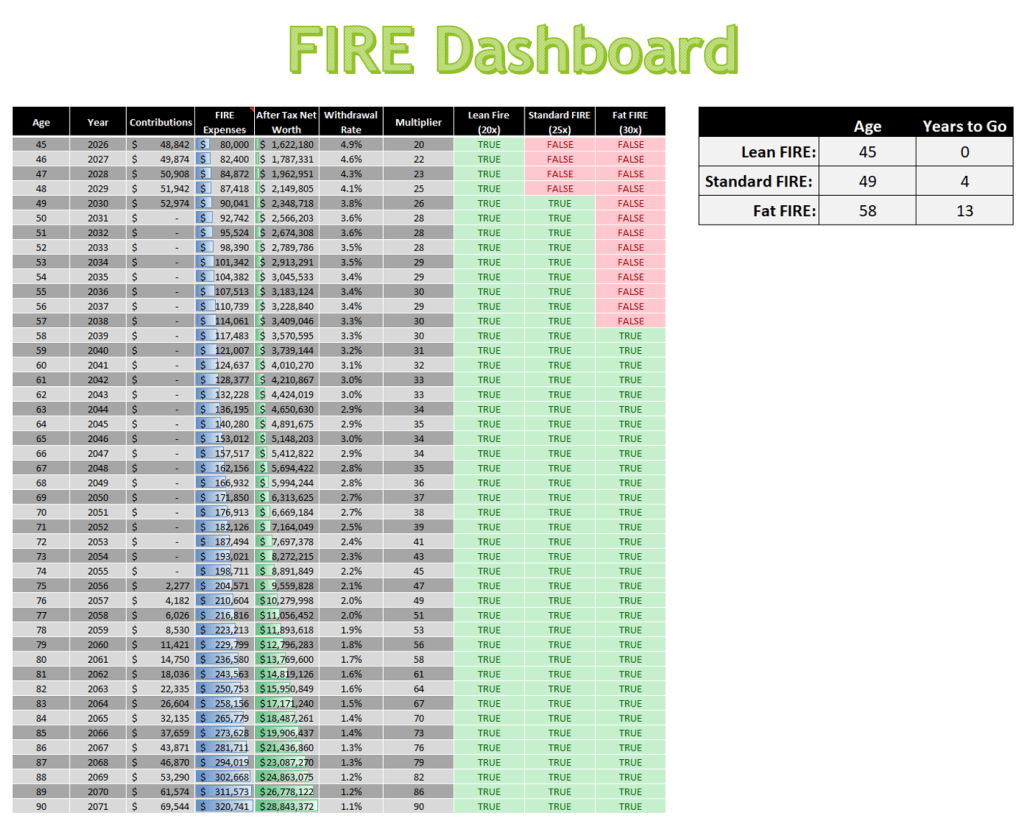
Available now at https://excelappshop.etsy.com Whether you’re aiming for Lean FIRE, Standard FIRE, or Fat FIRE, this dashboard shows exactly where you stand and how far you have to go.
🔍 What’s Inside the Dashboard?
- Year-by-Year Tracking: See your age, contributions, FIRE expenses, and after-tax net worth across your entire retirement horizon.
- Withdrawal Rate & Multiplier: Instantly assess your sustainability using dynamic withdrawal rates and FIRE multipliers.
- FIRE Milestone Flags: Visual indicators show when you hit Lean (20×), Standard (25×), and Fat (30×) FIRE thresholds.
- Summary Panel: A clean sidebar highlights the age and years remaining until each FIRE milestone is achieved.
🧠 Why It Matters
Traditional retirement calculators often bury the signal in noise. This dashboard isolates the key metrics that matter most to early retirees:
- After-tax net worth — not just gross balances
- Tax-aware modeling — including Roth conversions, IRMAA, and Social Security taxation
- Lifestyle-based expenses — separating strategic tax moves from true cost of living
It’s not just a spreadsheet — it’s a decision engine.
💡 Built for Clarity, Designed for Action
This feature is built on the same principles the FIRE community has used for years to determine when they can retire. We are taking the withdrawal rates, spending multipliers, and after‑tax net worth focus that the community already relies on and applying those ideas in a tool that also enables you to optimize your Roth IRA conversions and calculate your risk with a Monte Carlo analysis. Nothing here is new to FIRE followers. We are simply packaging the existing concepts into a clear, intuitive, and fully tax‑aware dashboard that supports real‑world decision making.
-
New Release: Early‑Withdrawal Modeling, 72(t), and Rule of 55
Retirement planning isn’t one‑size‑fits‑all, especially for people who step off the traditional retirement timeline. This update is designed specifically for the groups who need accurate early‑withdrawal modeling:
- FIRE households building long‑term tax‑efficient drawdown plans
- Early retirees bridging the gap before Social Security or pensions begin
- Career changers who qualify for the Rule of 55
- Anyone using 72(t) SEPP withdrawals to access IRA funds penalty‑free
If you fall into any of these categories, this release gives you a level of precision that’s hard to find anywhere else.
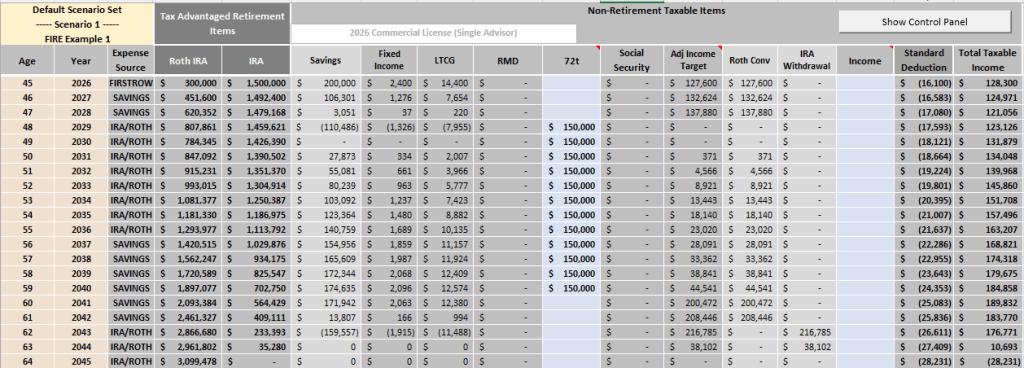
Available at excelappshop.etsy.com Automatic 10% Penalty for Early IRA Withdrawals
The IRS early‑withdrawal penalty is simple in theory but messy in practice. Until now, users had to approximate the penalty manually or adjust assumptions outside the model.
The Optimizer now handles this automatically:
- Detects early withdrawals before age 59½
- Applies the 10% penalty exactly where required
- Integrates the penalty into taxes, cash flow, and long‑term projections
- Ensures your after-tax net worth and scenario comparisons reflect real IRS early withdrawal behavior
This is especially valuable for FIRE and early‑retirement scenarios where withdrawals begin long before traditional retirement age.
Full Support for 72(t) SEPP and Rule of 55 Withdrawals
Early‑withdrawal exceptions are essential tools for people retiring early or transitioning careers. This update adds support for two of the most widely used exceptions:
72(t) SEPP (Substantially Equal Periodic Payments)
The Optimizer now models SEPP withdrawals correctly:
- Penalty‑free
- Treated as ordinary income
- Integrated into cash‑flow projections
- Automatically excluded from the 10% penalty logic
Rule of 55
For those separating from service at age 55 or later, the Optimizer now handles penalty‑free withdrawals from employer plans with complete accuracy.
Both features work seamlessly with your existing scenario sets, Roth Conversion Optimizations, and Monte Carlo simulations.
Built Without Compromising the Roth Conversion Engine
One of the most important parts of this release is how these features were added.
The early‑withdrawal logic, penalty rules, and exception handling were integrated in a way that preserves the integrity of the Optimizer’s core algorithm. The tool still:
- Evaluates hundreds of potential conversion paths
- Models tax interactions year‑by‑year
- Accounts for penalties, exceptions, and cash‑flow needs
- Identifies the optimal Roth conversion strategy with the same precision as before
In other words, you get richer, more realistic modeling without sacrificing the accuracy of the conversion-optimization engine. The algorithm adapts to the new rules rather than being constrained by them.
Why This Matters
These enhancements make the Optimizer far more capable for real‑world planning, especially for:
- People retiring in their 40s or 50s
- Households bridging income gaps before Social Security
- Anyone balancing Roth conversions with early‑withdrawal needs
The result is a tool that mirrors IRS rules more closely, handles edge cases more intelligently, and gives you clearer insight into the long‑term impact of your decisions.
-
Announcing the 2026 Release of the Roth IRA Conversion Optimizer
The 2026 edition of the Excel Roth IRA Conversion Optimizer spreadsheet is now available, bringing your planning tools fully up to date with the latest federal tax changes and retirement‑related thresholds.
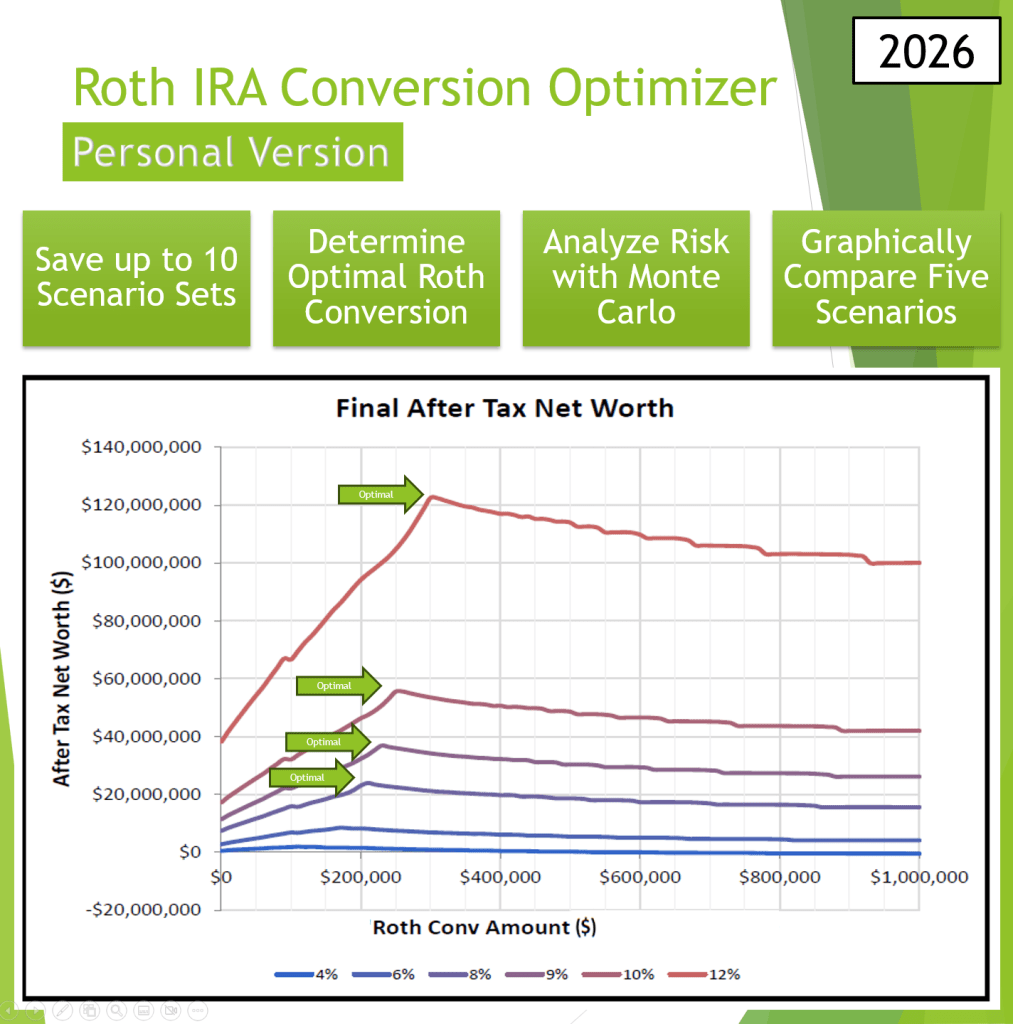
Available now at https://excelappshop.etsy.com 🔄 What’s New in the 2026 Version
The 2026 update incorporates all major federal changes relevant to Roth conversion planning, including:
- Updated Federal Income Tax Tables
- Updated Medicare Part B and Part D IRMAA thresholds
- Updated NIIT (Net Investment Income Tax) thresholds
- Updated Standard Deductions
- Updated Long‑Term Capital Gains brackets
These updates ensure that every projection, tax calculation, and Monte Carlo scenario reflects the most accurate 2026 federal landscape.
🏛️ State Tax Tables: Temporary 2025 Inflation-Adjusted Brackets
Not all states have released their 2026 tax brackets yet. They are all expected to be completed in February.
Until then, the Optimizer uses inflation‑adjusted 2025 state tax tables as a placeholder. Once states finalize their 2026 brackets, an incremental update will be released.
💡 All the Powerful Features You Already Rely On
The 2026 Optimizer retains everything users loved about the 2025 version:
✔ Optimal Roth Conversion Engine
Automatically identifies the conversion amount that minimizes lifetime taxes and maximizes long‑term after‑tax wealth.
✔ Full Monte Carlo Risk Analysis
Models market uncertainty to show how different conversion strategies perform across thousands of simulated futures.
✔ Personal & Commercial Versions
- Personal Versions — built for individual investors who want clarity and control
- Commercial Versions — designed for financial advisors who need a professional‑grade planning tool for client work
🚀 Ready for 2026 and Beyond
The Roth IRA Conversion Optimizer continues to evolve with the tax code, Medicare rules, and best‑practice planning techniques — giving you a reliable, forward‑looking tool for one of the most important retirement decisions you’ll ever make.
-
Introducing the Commercial Versions of the Roth IRA Conversion Optimizer
Until now, the Roth IRA Conversion Optimizer has been licensed strictly for personal use. Advisors and planners regularly reached out asking for a way to use it with clients — but the licensing didn’t allow professional use.
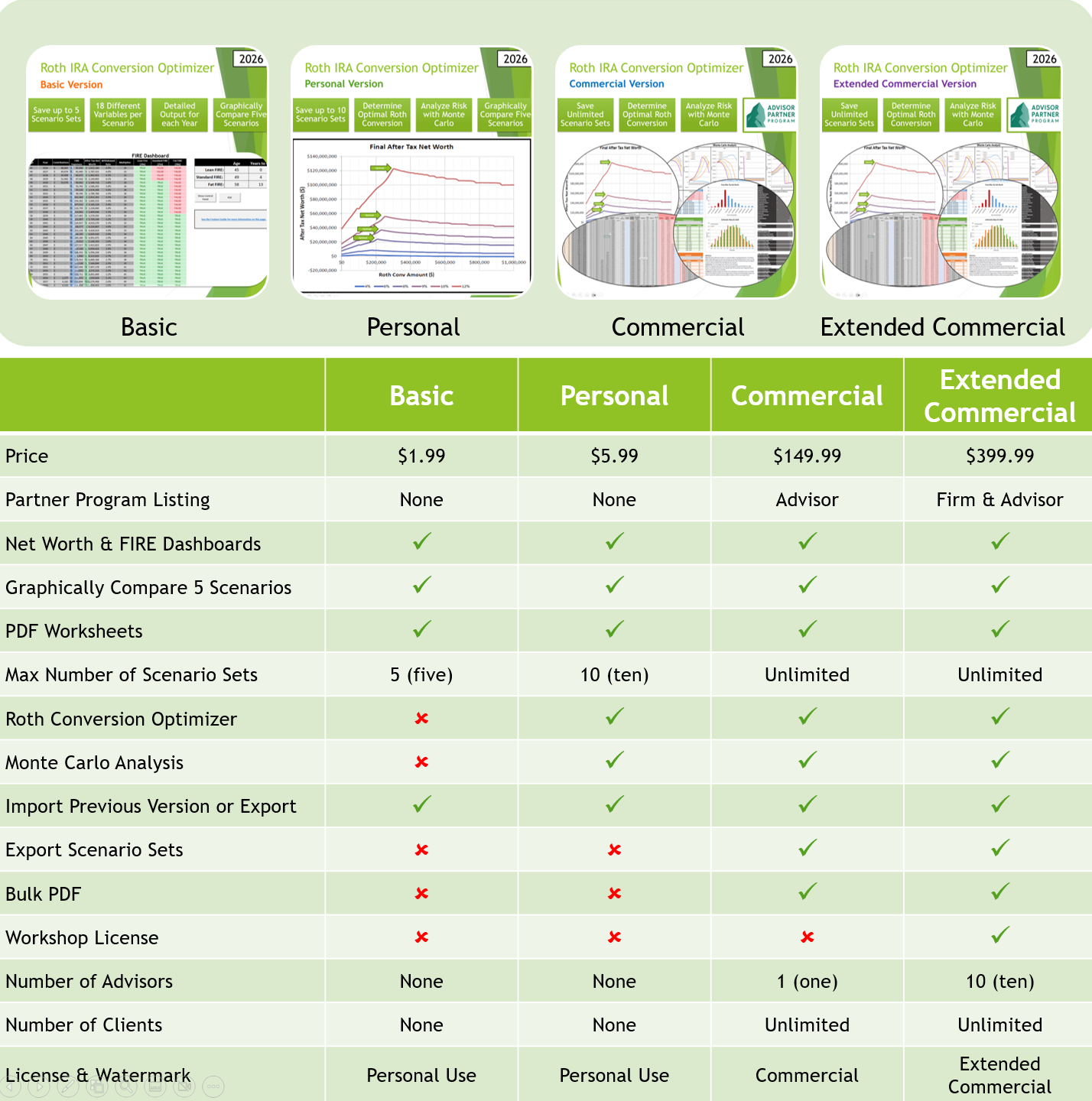
That’s exactly what the new Commercial and Extended Commercial versions are built for. These editions officially open the Optimizer to advisors, giving you the tools, permissions, and features needed to use it confidently in client meetings, workshops, and planning sessions.
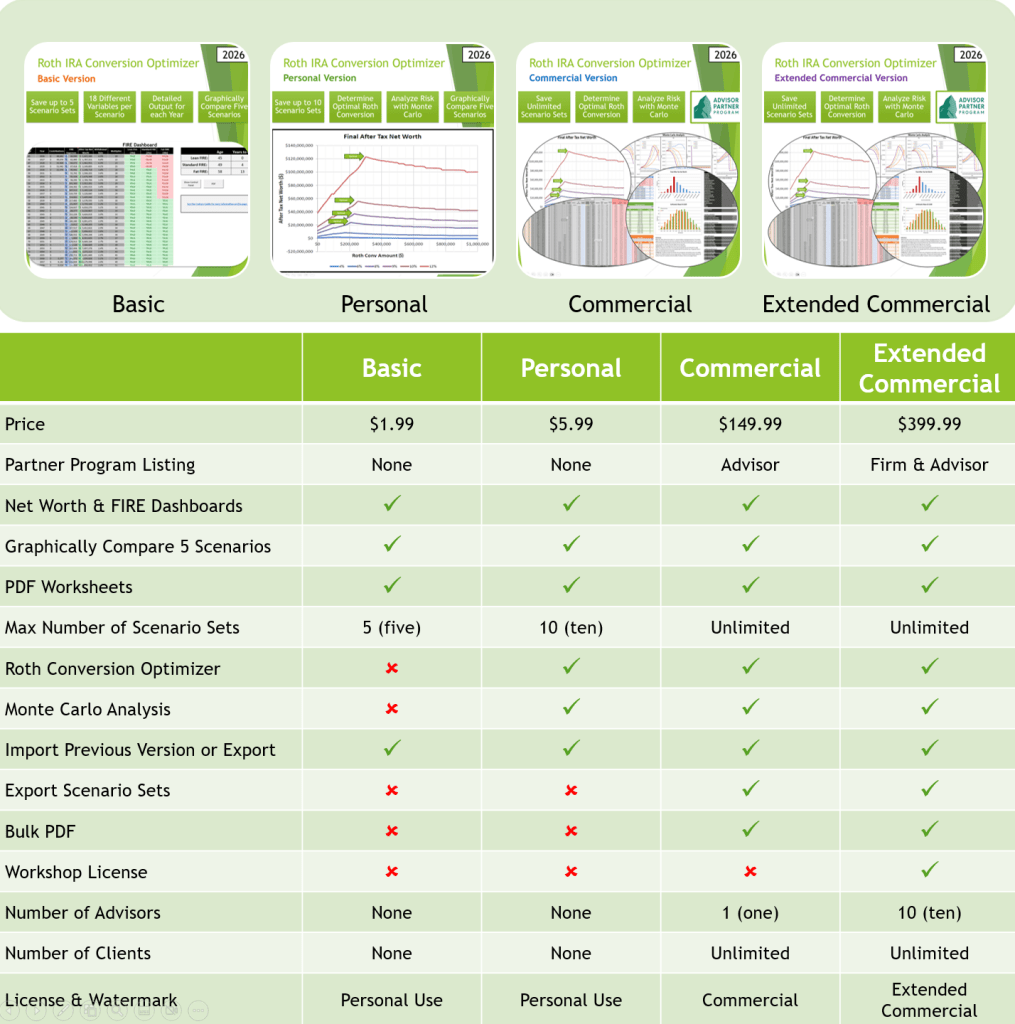
Available now at https://excelappshop.etsy.com The Commercial version is for a single advisor. The Extended Commercial version provides a license for up to 10 advisors, making it perfect for small firms, workshops, and collaborative teams.
Both versions include a set of new capabilities designed specifically for professional workflows:
- Save unlimited Scenario Sets for each client
- Export Scenario Sets to keep client data organized
- Generate bulk PDFs for client folders
- Present branded worksheets with a commercial watermark
- Serve unlimited clients under one license
These additions make the Commercial editions ideal for advisors who want a streamlined, professional, and scalable Roth conversion workflow.
Still Need Just the Basics?
The Basic and Personal versions remain available for individual users who want to explore Roth conversion strategies with up to 10 scenario sets, graphical comparisons, and PDF exports — all at an accessible price point.
Pricing Overview
- Basic: $1.99
- Personal: $5.99
- Commercial: $149.99
- Extended Commercial: $399.99
Tax-Year Access and Updates
Each version provides access to all updates within a given tax year. Future tax years must be purchased separately. Purchases made in early 2026, before the 2026 version is released, will get access to both the 2025 version and the 2026 version when it becomes available.
My goal has always been to help people make smarter, tax‑efficient retirement decisions — and now advisors can bring those insights directly to their clients.
-
Now Available: Mac Version of the Roth IRA Conversion Optimizer
Great news — the Excel Roth IRA Conversion Optimizer is now fully compatible with Excel for Mac (Microsoft 365), with the same full feature set as the Windows version.

Available now at https://excelappshop.etsy.com The Optimizer gives you a powerful, flexible way to analyze your retirement strategy directly in Excel:
- View your optimal Roth conversion amount in a single chart
- Run a Monte Carlo analysis to understand market risk
- Compare five different retirement scenarios at once
- Save unlimited Scenario Sets for future reference
- Export all reports to PDF for easy review or printing
This tool eliminates the constant re‑entry of data that plagues most retirement calculators. Instead, you build a set of five scenarios, compare them visually, save them, and repeat as many times as you like — now on both Mac and Windows.
If you’ve been waiting for a Mac‑ready release, it’s here.
Technical Requirements & Compatibility
To ensure you have the best experience, please note the following system requirements:
- Software: Requires the latest version of Microsoft Excel for Windows or Mac (Microsoft 365).
- VBA Macros: As this is a VBA-powered application, macros must be enabled to run the calculations and scenario comparisons.
- Unsupported Platforms: This tool is not compatible with Google Sheets, Apple Numbers, or web-based versions of Excel.
-
Long-Term Capital Gains Now Available!
Version 3.2 is now available with a significant change to the way taxes are calculated for non-retirement savings. The earnings on Savings are now broken into two buckets: Fixed Income and LTCG (Long-Term Capital Gains). The Fixed Income bucket has its own growth rate, and it will be taxed along with the other taxable income. The LTCG bucket will continue to use “Savings Return” for the growth rate but will now be taxed using the new capital gains tax calculator.
The new capital gains calculator supports all three brackets (0%, 15% and 20%) for all three filing statuses (Single, HOH, MFJ). Additionally, a new NIIT calculator and column has been added so people can easily see when their investment income has triggered the additional 3.8% NIIT. Both calculators adjust the brackets for inflation like the State and Federal Tax calculators.

Main Worksheet with New/Updated Sections Highlighted To keep the model simple and easy to use, all LTCG taxes occur in the same year as they are received. Although, in reality, you will have to wait at least a year before selling to qualify for LTCG. Also, it may make sense to defer paying capital gains as long as possible. Consult with a financial advisor about what makes the most sense for you. Since LTCG tax is counted after income tax, the timing of the LTCG should have minimal impact on the Roth Optimization function.
There are two new settings in the “Additional Settings” section (cells I12 to J13 on the Scenario Sets worksheet). The first is a “Fixed Income Percentage” setting that sets how much of your Savings column is Fixed Income versus equities. The second is a “Fixed Income Return” setting which sets the return on the Fixed Income portion.
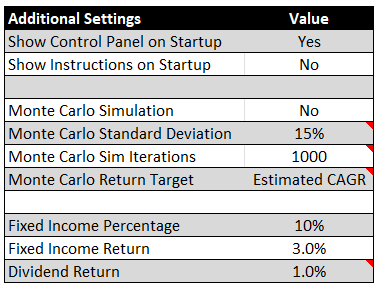
Additional Settings for Fixed Income Investments At the state level, the LTCG bucket will continue to be taxed as ordinary income. If you are in one of the 8 states that has a special bracket for LTCG, be aware that the tool will show slightly more state tax. As a reminder, this tool is not tax software. Its tax models are designed for long-term modeling purposes and do not consider all the subtleties around deductions, credits, exemptions, adjustments, and state/local rules in any given year. Additionally, the brackets for future years are adjusted for inflation based on the 2025 values. This can be adjusted via the “Tax Bracket Inflation Rate” setting, but there is no way of knowing what the future brackets will look like. It could be significantly different.
Lastly, the Social Security benefit calculation has also been changed. Now, instead of users calculating the amount of the benefit in the year their benefit starts, they can put the benefit into the tool in 2025 dollars, and the tool will automatically calculate the future value of that benefit for you.