
A smoother, more intuitive experience just landed in the Roth IRA Conversion Optimizer.
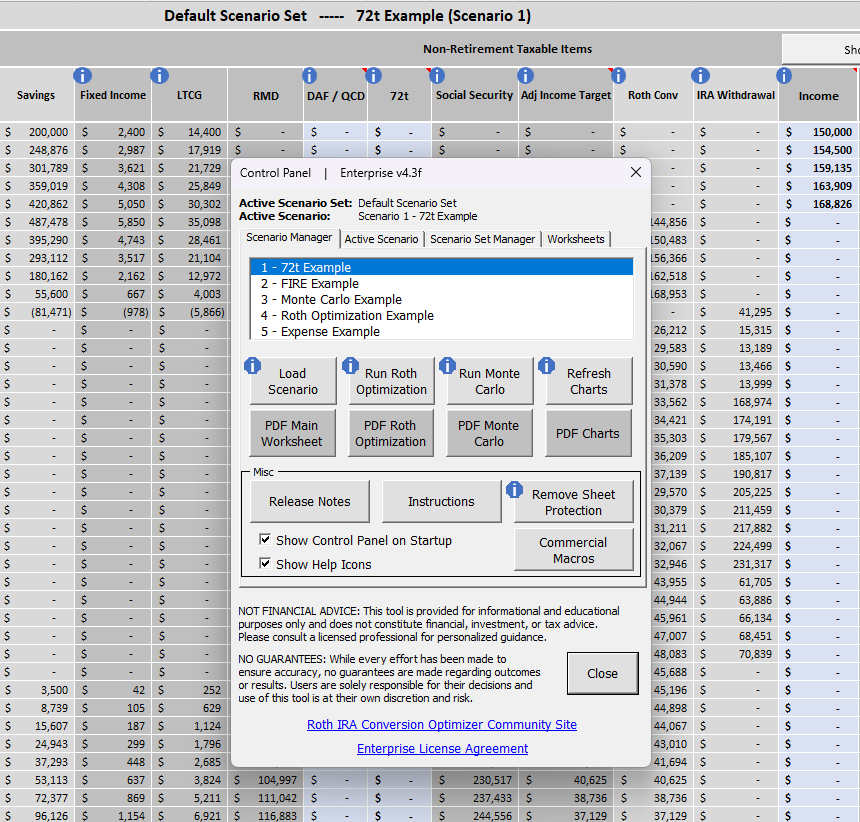
We’ve added a new Help Icons feature throughout the worksheets and Control Panel—designed to give you instant, context‑specific guidance right when you need it. Whether you’re reviewing inputs, adjusting scenarios, or exploring Monte Carlo results, these icons make it easier than ever to understand what each field represents and how it affects your analysis.
What Help Icons Do
Each blue information icon now links directly to the corresponding article in the Optimizer’s online Knowledge Base. That means:
- Faster answers without searching through documentation
- Clear explanations for every major input and setting
- Consistent guidance across all scenarios and workflows
If you’re onboarding new team members or revisiting the tool after a break, these icons help you get up to speed quickly.
Turn Them On or Off Anytime
Prefer a cleaner interface? You can toggle Help Icons with a single click.
Just open the Control Panel and uncheck Show Help Icons. Want them back? Check the box again. It’s that simple.
Why This Matters
The Optimizer has grown into a powerful, professional‑grade analysis engine—used by both individual investors and financial advisors. As the tool expands, clarity and usability become even more important. These Help Icons ensure that every user, at every experience level, can confidently navigate the model and understand the logic behind each input.
Available Now
This feature is included in the latest release and is available to all customers. If you haven’t downloaded the newest version yet, you’ll see the Help Icons as soon as you update.